- Página de inicio /
- Electrónica /
- Accesorios de ordenador /
- Tablet Replacement Parts /
- Screens /
- Touch Screen Panel Digitizer (Without LCD Dis...
0 ratings




Artículo nº.:
77198500
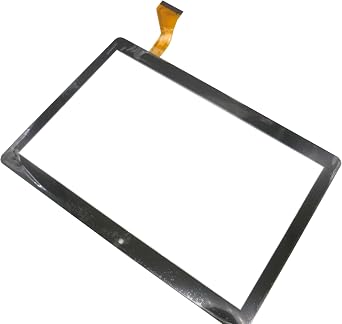
Touch Screen Panel Digitizer (Without LCD Display) Replacement Compatible with Dragon Notepad K10 10.1 inch Tablet (Black)
Artículo nº.:
77198500
€ 19
Detalles del precio
Sin incluir gastos de envío y aduana ( Los gastos de envío y aduana se calcularán al finalizar la compra )
*Todos los artículos se importarán desde EE. UU.
En stock
 Importado de la tienda USA
CANT.:
Solo quedan 7 artículos en stock.
Haz tu pedido ahora y recíbelo el Miércoles, Agosto 26
Transacción segura
Ubuy trabaja arduamente para proteger tu seguridad y privacidad. Nuestro avanzado sistema de seguridad de pagos garantiza la confidencialidad al cifrar tu información durante la transmisión mediante los protocolos AES (Estándares de Cifrado Avanzado) y SSL (Capa de Conexión Segura). Tus datos de pago están 100% seguros, ya que no compartimos tus detalles de pago con vendedores externos.
Nuestros mejores socios logísticos


Broken your Touch Screen Panel Digitizer (without LCD Display), don't need to change new machine, just buy this item and replace your damaged Touch Screen Panel Digitizer (without LCD Display), let your Device work again.

Compra ahora, paga después

Envío
rápido

Devolución
gratuita*

Embalaje seguro

Productos 100% originales

Cumple con PCI DSS

Certificado ISO 27001





Note: Step Down Voltage Transformer required for using electronics products of EE. UU. store (110-120). Recommended power converters Comprar ahora.


Lo que más destaca
Precise Compatibility
Designed specifically for the Dragon Notepad K10 10.1 inch tablet, ensuring a perfect fit and seamless integration for hassle-free replacements.
Enhanced Touch Sensitivity
The high-quality digitizer offers exceptional touch responsiveness, providing a smooth user experience and quick access to all tablet features.
Easy Installation
With user-friendly design and included installation tools, this digitizer allows for straightforward DIY replacement, saving time and repair costs.
Detalles del producto
| Product Dimensions (L x W x H) | 1.97 x 1.18 x 0.79 inches (5 x 3 x 2 cm) |
| Item Weight | 1.08 pounds (490 grams) |
| Other display features | Wireless |
| Color | Black |
| Manufacturer | LeHang |
| Date First Available | May 31, 2022 |
¿Quién debería comprarlo?

-
DIY Repair Enthusiasts
Ideal for users comfortable with electronics repair and seeking a cost-effective solution to replace their tablet screen.
-
Budget-Conscious Users
Perfect for those wanting to extend the life of their Dragon Notepad K10 tablet without investing in a new device.
-
Tablet Maintenance
Suits individuals needing a replacement for damaged touch screens, ensuring continued use of their existing tablet.

-
Non-technical Users
Not suitable for those unfamiliar with electronic repairs, as installation may require technical skills and tools.
DESCRIPCIÓN DEL PRODUCTO
¿Tienes alguna consulta? Chatea con nosotros
Preguntas y respuestas de los clientes
-
Pregunta:
What is the main function of the Touch Screen Panel Digitizer for the Dragon Notepad K10?
Respuesta: The Touch Screen Panel Digitizer serves as the interface for user interaction with the Dragon Notepad K10 tablet. It converts touch inputs into signals that the device's software interprets, allowing users to navigate, browse, and interact with applications seamlessly. For instance, if the screen isn't responsive or has cracks, replacing the digitizer ensures your tablet functions like new, restoring its touch capabilities. -
Pregunta:
How do I know if I need to replace my tablet's digitizer?
Respuesta: Signs that indicate a need for replacement include an unresponsive touch screen, areas of the screen that do not register touch, or physical damage like cracks or scratches. If basic troubleshooting fails, such as rebooting the device or performing a soft reset, it's likely time for a new digitizer. By replacing it, you can regain full control over your tablet, making it functional for everyday tasks like browsing and note-taking. -
Pregunta:
Can I replace the digitizer myself, or should I seek professional help?
Respuesta: Replacing the digitizer can be a DIY project if you have some technical skills and the right tools, such as screwdrivers and opening tools. However, if you're unfamiliar with tablet repairs, consulting with a professional is advisable. Seeking help can ensure the replacement is done with precision, minimizing the risk of further damage, and allowing you to quickly return to using your tablet without stress. -
Pregunta:
Is the digitizer compatible with other models apart from the Dragon Notepad K10?
Respuesta: The Touch Screen Panel Digitizer is specifically designed for the Dragon Notepad K10 tablet, ensuring optimal fit and performance. While some similar models may use compatible parts, each model may have distinct dimensions or connector placements. For best results, ensure you purchase components specifically designed for your tablet model to avoid any functional issues after installation. -
Pregunta:
What tools will I need to install the digitizer?
Respuesta: To install the digitizer, you will require tools such as a small Phillips head screwdriver, a plastic opening tool, and possibly tweezers. Additionally, having a work surface that minimizes static electricity can help avoid damage to your device’s internals. Having the correct tools ensures that the installation process is smooth, allowing you to focus on accurately replacing the digitizer without unnecessary hassle. -
Pregunta:
What should I do if my screen is cracked but still responsive?
Respuesta: If your screen is cracked yet still responsive, it's advisable to replace the digitizer before the damage worsens. Cracked screens can lead to further deterioration and affect touch sensitivity over time. Addressing the issue promptly not only preserves functionality but also enhances your user experience while using applications like note-taking or browsing, making your tablet safer and more enjoyable. -
Pregunta:
What are common troubleshooting steps before replacing the digitizer?
Respuesta: Common troubleshooting steps include restarting your tablet, checking for software updates, and performing a factory reset. These actions can sometimes resolve temporary issues with touch responsiveness. If the problems persist despite these measures, replacing the digitizer becomes a practical solution to restore usability and ensure your tablet operates smoothly for tasks such as online reading or digital note-taking. -
Pregunta:
Is it safe to use my tablet if the digitizer is malfunctioning?
Respuesta: Using a tablet with a malfunctioning digitizer can lead to frustrating experiences such as inadvertent app launches or difficulty navigating. It is advisable to avoid relying on the device for critical tasks until the digitizer is replaced. Continuing to use it in this state may not only hinder productivity but could also result in accidental damage, such as further cracking of the screen or issues with internal components. -
Pregunta:
What is the difference between a digitizer and an LCD display?
Respuesta: The digitizer and LCD display serve distinct functions within a tablet. The digitizer is responsible for registering touch inputs, while the LCD display presents images and content to the user. If you're experiencing visual issues alongside touch problems, you may need to consider both components for replacement. Understanding this distinction can help you accurately diagnose issues and determine the necessary repairs to restore full functionality. -
Pregunta:
Where can I buy Touch Screen Panel Digitizer Without LCD Display Replacement Compatible with Dragon Notepad K10 10.1 inch Tablet Black in Spain?
Respuesta: You can purchase the Touch Screen Panel Digitizer without the LCD display replacement for the Dragon Notepad K10 tablet on Ubuy in Spain. Ubuy offers a user-friendly platform that provides a range of options, allowing you to choose the best product for your repair needs. With competitive pricing and delivery options, Ubuy makes it convenient for customers to access quality replacement parts.
LeHang Screens Editorial Review
No se encontraron reseñas editoriales
Reseñas y valoraciones de clientes
1 valoraciones de los clientes
-
5 estrella
100%
-
4 estrella
0%
-
3 estrella
0%
-
2 estrella
0%
-
1 estrella
0%
Escribir una reseña de este producto
Comparte tu opinión con otros clientes
Ventajas
- Fácil de instalar
- High sensitivity touch
- Duradero y de larga duración
- Compatible with Dragon Notepad K10
- Improved screen responsiveness
Desventajas
- No installation instructions included.
CONFIANZA EN LA PLATAFORMA Y SEGURIDAD DEL COMPRADOR

MA
Mohammad
Verified buyer
“Excellent quality and original too,when ubuy send original things I will appreciate that ,I very satisfied thank you”
23 July 2026 · via Trustpilot
CK
Chitra
Verified buyer
“The order and delivery progress was communicated very well. Package arrived within the estimated time. Products arrived as expected in good condition.”
22-Jul-26 · via Trustpilot
K
kund
Verified buyer
“Good supply of products. Safe payment methods, and shipment worldwide! Genuine products.”
23-Jul-26 · via Trustpilot
OO
Onesi
Verified buyer
“Was my first time buying a product from Ubuy, but I found it so helpful. This is reliable. Gonna place a new order!”
22 July 2026 · via Trustpilot
SJ
SAO JOHN
Verified buyer
“Ubuy is a great online platform to buy stuff. Reliable, fast delivery time and great value for money. I've been using Ubuy online shopping platform for three years now and will continue to do so.”
23 July 2026 · via Trustpilot
Pago seguro
Entrega mundial
Devoluciones fáciles
Productos genuinos
Historial de precios del producto
Información importante
- Limitaciones: para los productos enviados internacionalmente, hay que tener en cuenta que cualquier garantía del fabricante puede no ser válida; las opciones de servicio del fabricante pueden no estar disponibles; los manuales del producto, las instrucciones y las advertencias de seguridad pueden no estar en el idioma del país de destino; los productos (y los materiales que los acompañan) pueden no estar diseñados de acuerdo con las normas, especificaciones y requisitos de etiquetado del país de destino; y los productos pueden no ajustarse al voltaje y otras normas eléctricas del país de destino (lo que requiere el uso de un adaptador o convertidor, si procede). El destinatario es responsable de asegurarse de que el producto puede ser importado legalmente al país de destino. Al realizar un pedido a Ubuy o a sus filiales, el destinatario es el importador registrado y debe cumplir con todas las leyes y reglamentos del país de destino.
- No todos los productos que aparecen en Ubuy están a la venta, ya que Ubuy es un motor de búsqueda global. Los productos están sujetos a las normas de exportación/comercio.
€ 19
Haz tu pedido ahora y recíbelo el Miércoles, Agosto 26
Este artículo no está restringido en mi país. (Haga clic en el enlace anterior si este artículo no está restringido en su país, para que nuestro equipo lo revise y permita).
CANT.:
Solo quedan 7 artículos en stock.
Transacción segura
Cumplimos con PCI DSS y contamos con la certificación ISO 27001:2022, con pagos cifrados y protección total del comprador en cada pedido.
Nuestros mejores socios logísticos
La entrega internacional más rápida
Características y beneficios
- Replacement Touch Screen Panel Digitizer (without LCD Display)
- Compatible with Dragon Notepad K10 10.1 inch Tablet
- Easy to install, professional technician recommended
- Avoid the need to buy a new machine
- Fragile product, handle with care
- Contact seller for assistance
Garantía Ubuy
Compra sin preocupaciones: productos 100 % originales, pagos seguros conforme a PCI DSS, protección de datos con certificación ISO 27001, la entrega transfronteriza más rápida, devoluciones gratuitas* y embalaje seguro en cada pedido.